Upcoming Lessons
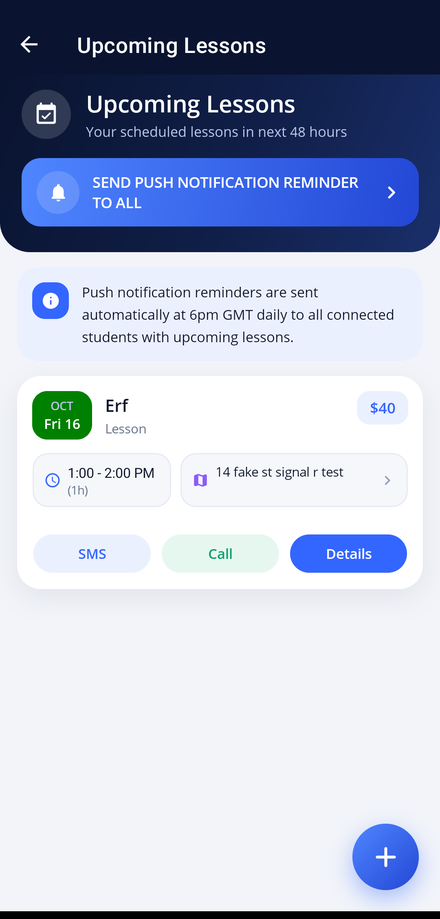
See every lesson booked over the next 48 hours and open any of them in a single tap.
Upcoming Lessons in the app, step by step
Filmed in the live app, at your own pace. Use the player controls to pause, replay or go full screen.
Good to know
- Push notification reminders are also sent automatically at 6pm GMT each day to connected students with lessons in the next 48 hours.
- Tap the + button at the bottom right to book a new lesson without going back to the diary.
- This list covers the next 48 hours only. Use Diary for anything further ahead.
Upcoming Lessons is the first thing to check each morning. It lists the lessons you have booked over the next 48 hours in date order, so you always know where you need to be and when.
-
Open the app
Launch Driving Instructor Manager and sign in. Your Instructor Dashboard is the home screen.
-
Tap Upcoming Lessons
Upcoming Lessons is the first tile on the dashboard. A quick tap opens the list.
-
Read the list
Each card shows the student's name, the lesson, the start and end time and the price, so you can see the whole day at a glance.
-
Contact a student
Use the SMS and Call buttons on a lesson card to message or ring the student without leaving the app.
-
Open the full lesson
Tap Details to open the lesson record, where you can change the time, add notes or record a payment.
-
Remind everybody at once
Tap SEND PUSH NOTIFICATION REMINDER TO ALL to push a reminder to every connected student who has a lesson coming up.